Scribd hosts millions of valuable documents including research papers, study guides, audiobooks, PDFs, magazines and more. But a premium subscription is required if you want to read some full PDFs or download books for offline viewing. To download Scribd documents for free, this guide tested and selected 11 best Scribd downloaders for free access to various content from Scribd. All the downloaders are online tools and are still functional now, just take a look and start your Scribd reading journey today.
⚠️ Disclaimer: This article is for academic exchange or to retrieve lost personal documents only. Tools that bypass Scribd’s restrictions could violate its terms of service. We do not encourage unauthorized downloading of copyrighted materials. Always ensure you have the legal right to access or download any content.
Reading Guide
What Is A Scribd Downloader?
A Scribd downloader is an online tool that allows students, professionals, researchers, or casual readers to download documents from Scribd for free.
Most documents on Scribd require a paid subscription to read full pages or to download. Scribd downloaders can extract pages and preview images through a valid Scribd document URL. These tools will download the images they got and recombine them into PDFs (the most commonly output format) for you. So it's free and convenient to access a wide range of Scribd resources for offline use, study, or reference.
11 Best Free Scribd Downloaders Still Working
We tested various Scribd downloaders based on usability, download speed, format support, ad frequency and more. In our testing, some tools worked reliably for full Scribd downloads, while others may fail to process more complex formats like presentations or eBooks. Read below to discover the pros and cons of different Scribd downloaders and choose the right one.
1. DownloadScribd
Website: https://downloadscribd.com/
DownloadScribd can be our first choice for a free Scribd downloader due to its clean interface and ad-free experience. In our testing, it successfully converted a 260-page textbook called Material Science and Metallury into a PDF in under 8 seconds, with no missing pages and minimal quality loss. It lets you download Scribd PDFs and PPTs without a login and there is a preview feature to verify content before saving.
👉 Note: Long documents or scanned files saved by Scribd downloaders could appear compressed and blurry. Use AVCLabs AI to sharpen the blurry text, reduce noise and enhance quality if needed.
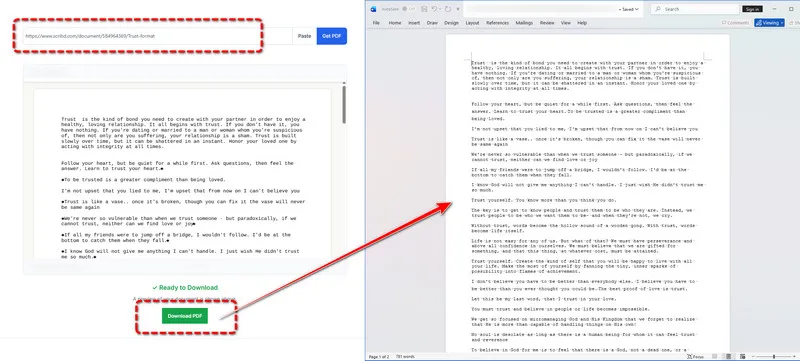
Why it's great:
- Ad-free interface ensures distraction-free use.
- Simple URL-based download process.
- Preview function helps confirm document accuracy.
- Fast conversion to PDF with minimal redirects.
Limitations:
- No other format options, only supports PDF output.
- Limited to public Scribd documents while private content is not accessible.
2. scribd-downloader
Website: https://scribd-downloader.co/
scribd-downloader.co offers a seamless downloading experience without any ads. We found that it can handle a 120-page documents smoothly, completing the conversion in about 5 seconds, so it can be one of the best Scribd downloaders. Furthermore, it specializes in PDF conversions and provides valuable document insights before downloading, including pages, rating, views, author information, and a brief description.
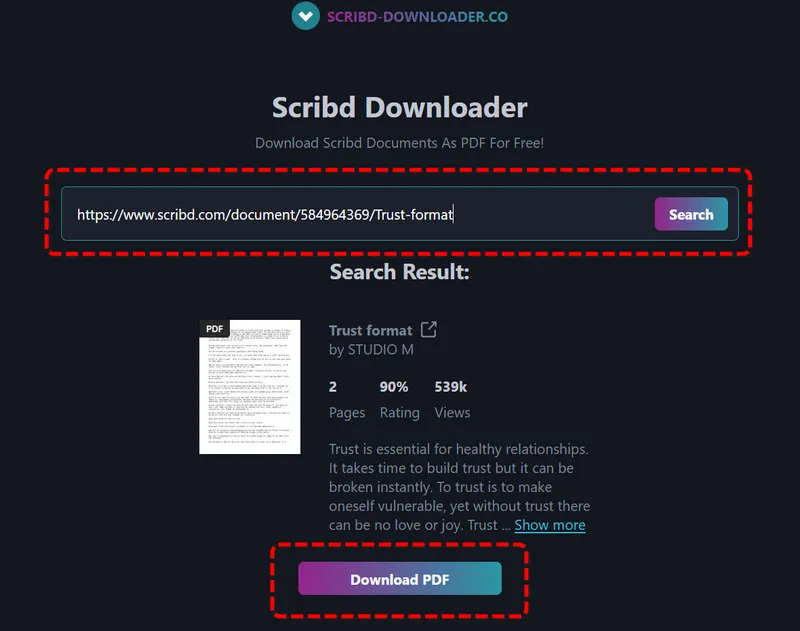
Why it's great:
- Clean, ad-free interface.
- Provides detailed document metadata.
- Easy-to-follow process for first-time users.
Limitations:
- Lack the full preview feature.
- Only outputs PDF files.
- May take slightly longer to process longer documents.
3. DocDownloader.Online
Website: https://www.docdownloader.online/en/
In practice, DocDownloader.Online performed well when handling standard PDFs. We also noticed that it combines ad-free Scribd to PDFs with an AI summary tool for lengthy files. A preview feature is provided when ready to download Scribd files. We believe that for those who only want a brief for a book, the AI summary tool is a standout feature, helping you condense long PDFs, DOCX, and TXT files for quicker review.
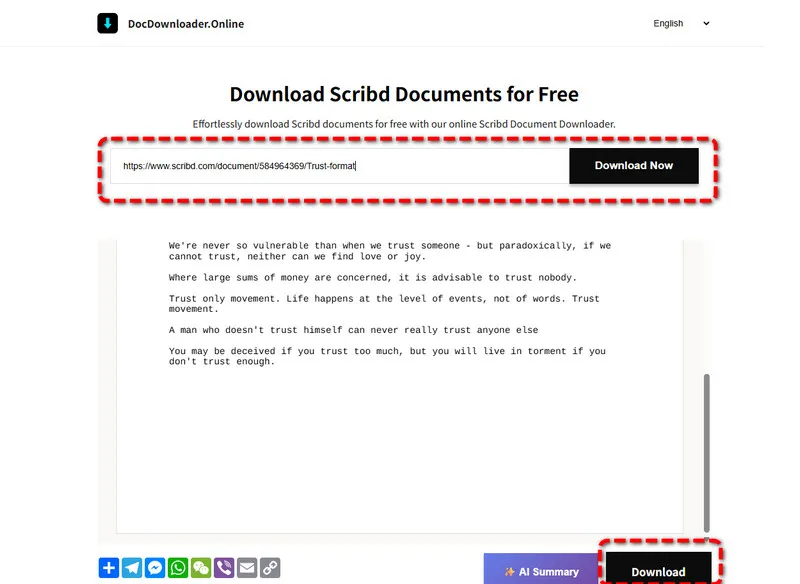
Why it's great:
- Ad-free and user-friendly interface.
- Full document preview capability.
- Includes free AI summary tool for long documents.
Limitations:
- The AI summary feature is not built-in, you need to visit another site to enjoy this.
- Limited format options compared to some tools.
4. DocDownloader
Website: https://docdownloader.com/
Although the tool name is similar to the last one, they are different Scribd downloaders. When we tested DocDownloader with a 60-page document, we did see its versatility with support for multiple output formats including PDF, DOCX, and PPTX. However, sometimes the format may not be compatible after download, except for PDFs. Thus, we would like to recommend that you save Scribd to PDFs for offline reading. While it does display pop-up ads, it remains popular for its practical usability.
Note: Are downloaded files blurry? Unreadable text makes you dizzy? Use AVCLabs AI to improve resolution for clear document reading.
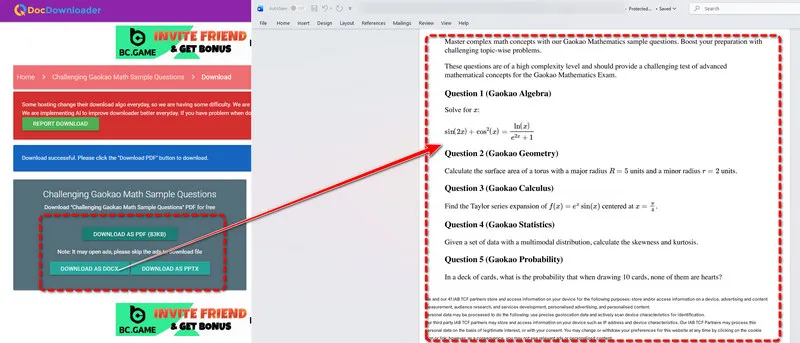
Why it's great:
- Supports PDF, DOCX, and PPTX output formats.
- Works with various Scribd document types.
- Free to use with no registration required.
Limitations:
- Displays pop-up ads during use.
- Does not support previewing the file before saving.
- Occasional format compatibility issues with complex documents.
5. Scribd.VDownloaders
Website: https://scribd.vdownloaders.com/
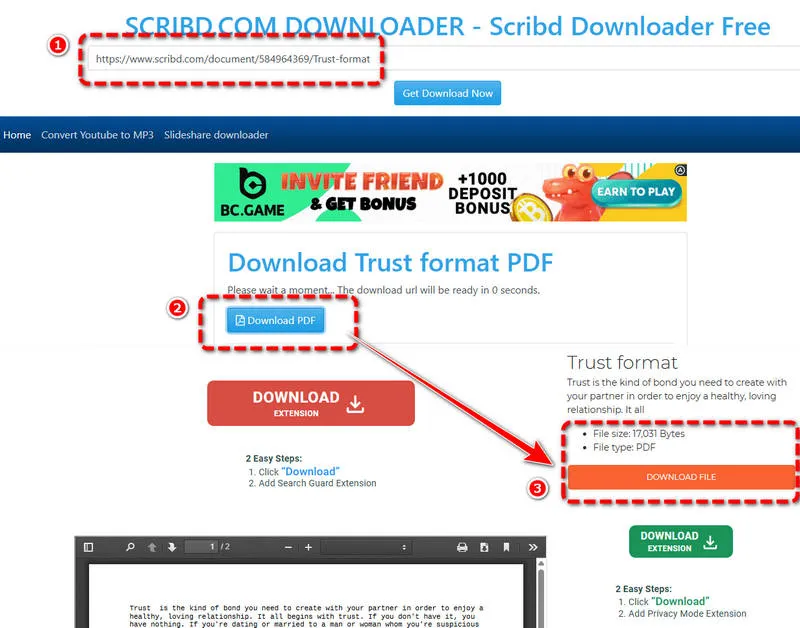
From our experience, Scribd.VDownloaders is also a good option for downloading Scribd documents for free. We pasted the tested document URL directly and it successfully extracted the file within 10 seconds. The preview feature allowed us to verify every page before downloading, which is a big plus compared to most tools. However, when we click to download a Scribd file, we will be redirected several times and need to be be careful not to click the wrong link, which is kind of annoying.
Why it's great:
- Two download methods for convenience.
- Includes document preview feature.
- Contains document size and a brief introduction for reference.
Limitations:
- Displays pop-up ads.
- Requires two redirects to complete downloads, which is not friendly to beginners.
- May have longer wait times during peak usage.
6. scribd.downloader.tips
Website: https://scribd.downloader.tips/
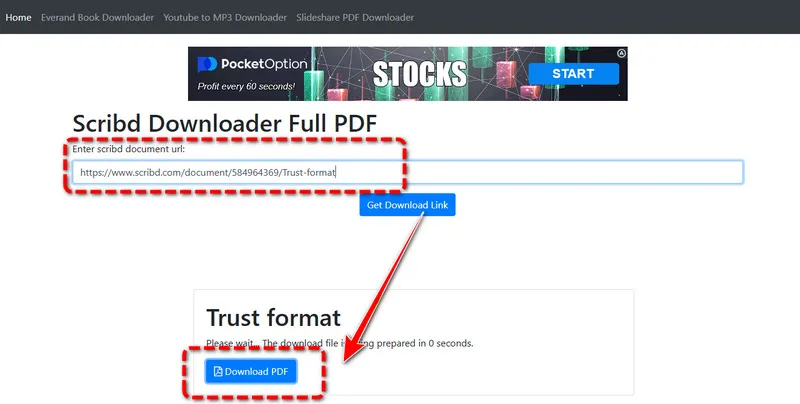
scribd.downloader.tips works fine to download Scribd without login. We like the function that it supports conversion by simply changing the Scribd domain link. It allows you to save Scribd files as PDF, DOC, and DOCX. However, when we wanted to test PPT, Excel or eBook outputs, formatting issues occasionally appeared. The lack of a preview made it harder to verify content beforehand. Another drawback is that the download process involves multiple redirects, so it may take some time before the file is generated.
Why it's great:
- Fast downloading speed for Scribd documents.
- Free access with no registration.
- Consistent PDF output.
Limitations:
- No document preview function.
- Pop-up ads.
- Only support downloading Scribd documents, not presentations or books.
7. scribd.vpdfs
Website: https://scribd.vpdfs.com/
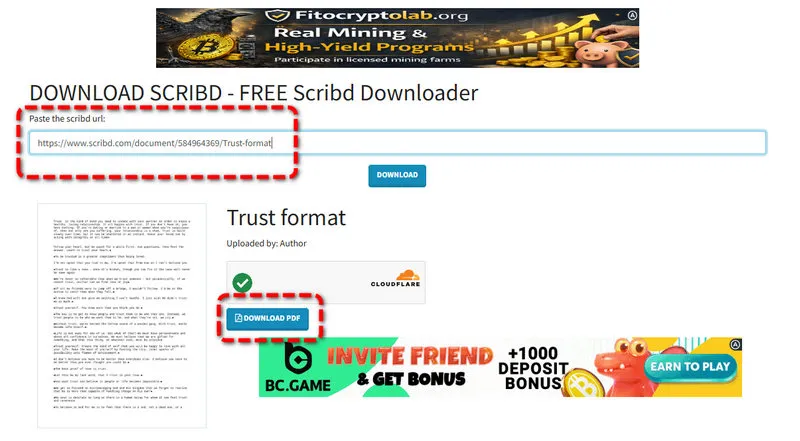
When testing a standard PDF document, scribd.vpdfs generated the file quickly. One slight surprise for us is that this tool enables you to download Scribd to PDFs using a dedicated Telegram bot. The Telegram bot option adds flexibility for users who prefer a mobile or messaging-based way. Among the free Scribd downloader tools available, it supports one of the widest ranges of formats, allowing you to convert documents, presentations, books, and even audiobooks into PDF effortlessly.
Why it's great:
- It allows you to download Scribd files for free using a Telegram bot.
- Free to use with no subscription.
- Works across devices and platforms.
Limitations:
- Displays pop-up ads.
- Only supports PDF output.
- Can't preview the files before saving.
8. scribdvdownloader
Website: https://scribdvdownloader.com/
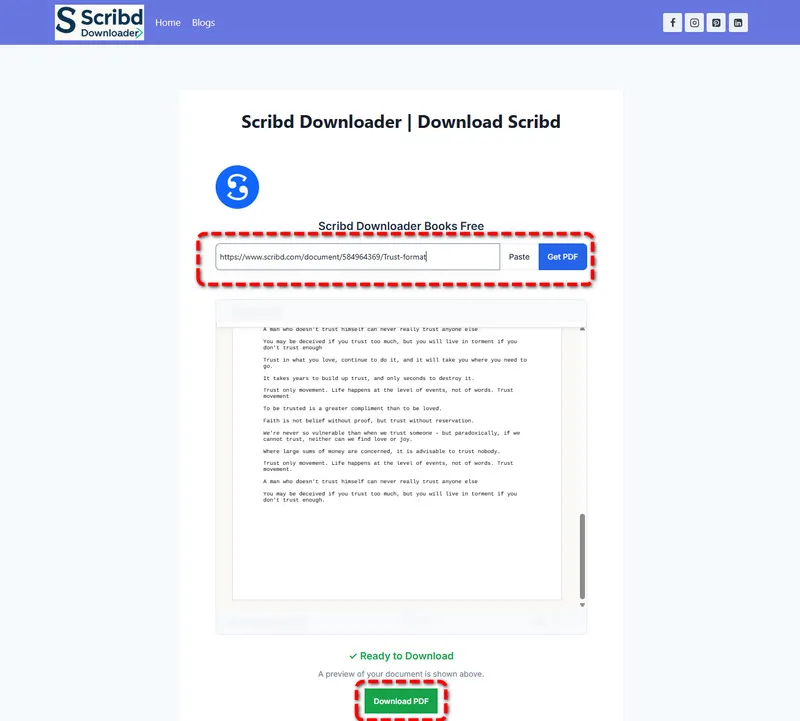
In our testing, scribdvdownloader successfully converted documents and presentations to PDFs, it took slightly longer, like around 2 minutes. What's more, book and audiobook links did not consistently produce usable files, despite being listed as supported. Still, with a clean and ad-free interface, scribdvdownloader can be a qualified Scribd downloader, providing a basic preview feature so we can check files.
Why it's great:
- Ad-free and user-friendly interface.
- Supports documents, presentations, books, and audiobooks.
- Includes preview function.
Limitations:
- Occasional stability issues.
- Redirects to external platform for downloads.
- Limited output format option, only PDF is available.
9. evano scribd downloader
Website: https://evano.com/1-scribd-downloader
evano Scribd downloader allows you to download Scribd to PDF for free and performed well when downloading presentations and books during our tests. However, we are not satisfied with the loading speed and redirects. It will occasionally lead you to external pages before completing the process, which can be confusing if you are not careful.
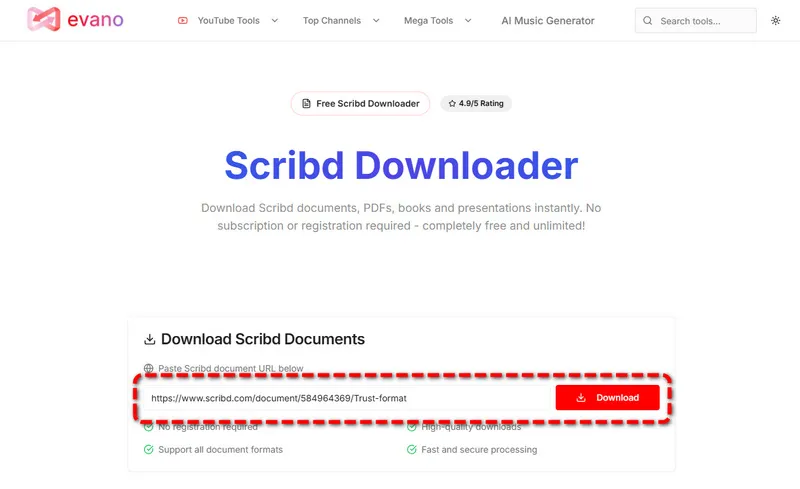
Why it's great:
- Extremely simple and intuitive interface.
- Supports various document types, like documents, presentations and books.
Limitations:
- Hidden redirects during the download process.
- Slow document parsing.
- Sometimes it get unstable.
- No preview feature.
10. fetchpik scribd downloader
Website: https://fetchpik.com/scribd-downloader.php
During the whole testing process, we encountered "file not found" errors on several valid URLs using fetchpik Scribd downloader, suggesting weaker scraping performance compared to other tools. It also lacks the preview feature, making it difficult to verify the Scribd content. But it did help us download Scribd documents for free successfully, which is why we listed it here as a backup with 25% success rate.
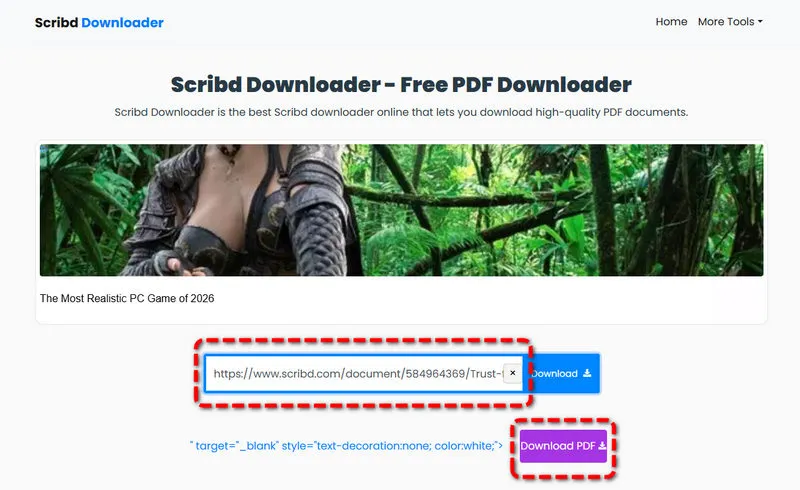
Why it's great:
- Simple, straightforward interface.
- No registration required.
- Free to use for basic downloads.
Limitations:
- Displays ads that require waiting.
- No document preview.
- Weaker scraping capabilities.
- Limited to PDF output.
11. ezetool scribd downloader
Website: https://ezetool.com/scribd-downloader
When we started testing ezetool Scribd downloader, we thought it unable to download documents from Scribd. Later, we found that it provided a smooth download experience once pop-ups were enabled. In practice, it works by opening downloaded documents in a new window. So if you want a quick download through this, you need to enable popups, otherwise, the tool simply wouldn’t work.
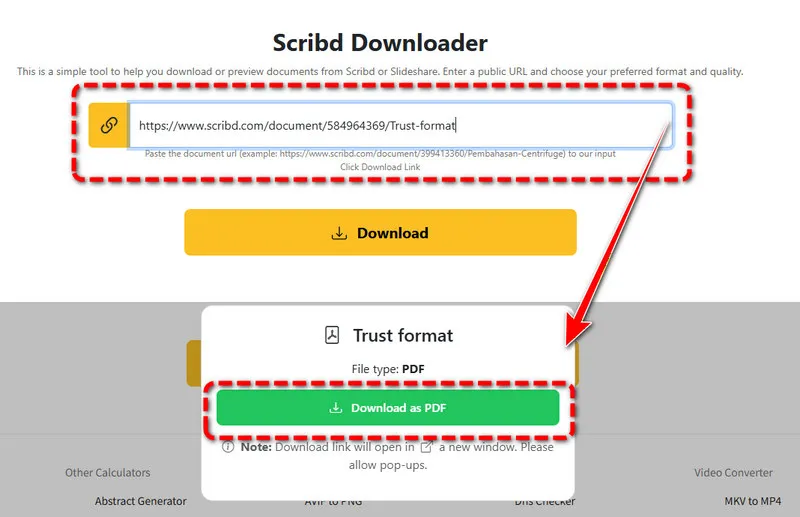
Why it's great:
- Ad-free interface.
- Download Scribd PDF, DOC, DOCX files for free.
- Simple to use.
Limitations:
- Requires enabling pop-ups to download Scribd documents.
- No preview feature.
- Only have PDFs output format.
Quick Comparison
| Scribd Downloaders | No Login | URL Support | Output Format | Download Speed | Ads |
|---|---|---|---|---|---|
| 1. DownloadScribd | ✅ | /document/, /presentation/ | Fast | No | |
| 2. scribd-downloader | ✅ | /document/, /presentation/ | Fast | No | |
| 3. DocDownloader.Online | ✅ | /document/ | Fast | No | |
| 4. DocDownloader | ✅ | /document/ | PDF/DOCX/PPTX | Fast | Yes |
| 5. Scribd.VDownloaders | ✅ | /document/, /presentation/ | Fast | Yes | |
| 6. scribd.downloader.tips | ✅ | /document/ | Fast | Yes | |
| 7. scribd.vpdfs | ✅ | /document/, /presentation/, /book/, /audiobook/ | Fast | Yes | |
| 8. scribdvdownloader | ✅ | /document/, /presentation/, /book/, /audiobook/ | Medium | No | |
| 9. evano scribd downloader | ✅ | /document/, /presentation/, /book/ | Slow | Yes | |
| 10. fetchpik scribd downloader | ✅ | /document/ | Slow | Yes | |
| 11. ezetool scribd downloader | ✅ | /document/ | Slow | No |
How to Enhance Blurry Scribd Documents with AI
Free Scribd downloaders help you read PDFs offline without a subscription, but how's the resolution? Downloaded documents espetically those scanned or older files usually suffer from blurriness and poor quality. Many are compressed after downloads, while using an AI image enhancer can help improve readability and clarity.
AVCLabs PhotoPro AI lets you enhance those blurry Scribd documents with AI-powered technology. This AI tool allows you to sharpen blurry text, improve resolution, restore details, reduce noise, and enhance overall clarity with just a few clicks. Whether for students or researchers, you can optimize your downloaded Scribd documents for better usability and printing. Besides enhancement, AVCLabs PhotoPro AI also features removing unwanted objects from your photographs, which helps you create a perfect and clean image.

AVCLabs PhotoPro AI
- Sharpen blurry photo easily by one click.
- Erase unwant element in the image.
- Transfrom photo into different types of art styles, such as anime and sketches.
- Enter description text to create unique creative photos.
Step 1 To enhance your blurry downloaded document, convert the PDFs into images. Then launch AVCLabs PhotoPro AI on your computer.
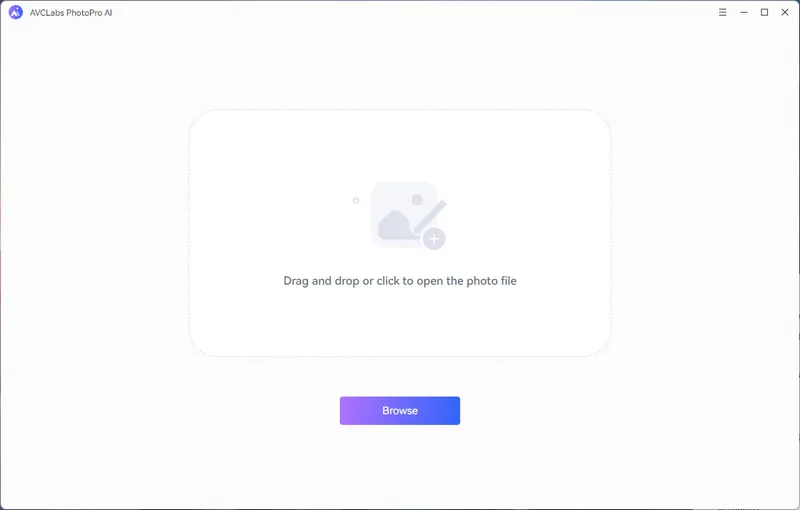
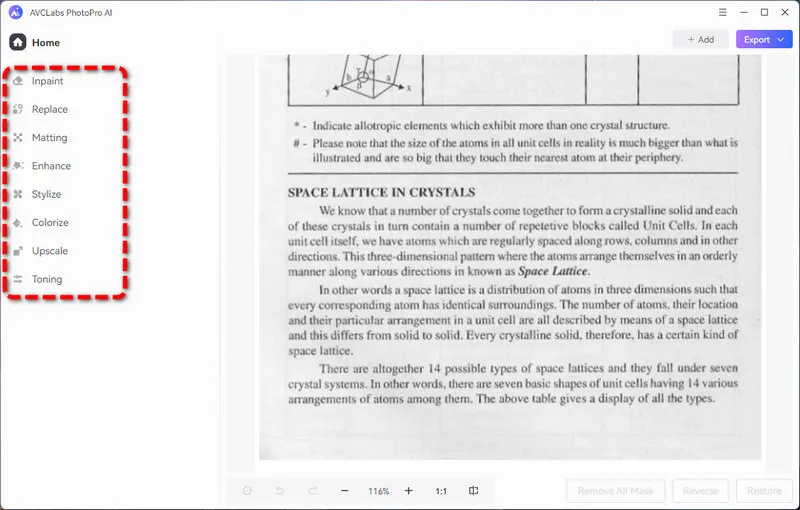
Step 2 Click the "Browse" button or simply drag your blurry image to upload it. Choose the "Enhance" feature from the left-side panel which helps improve the resolution.
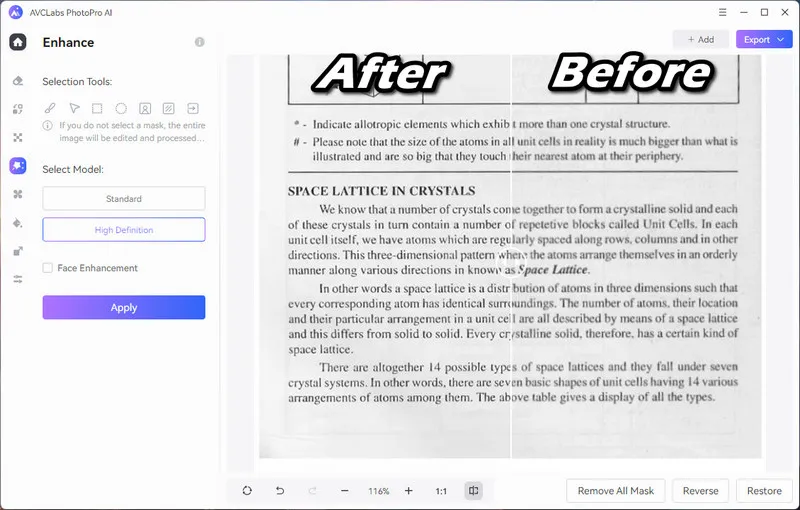
Step 3 Select model as "High Definition" and click the "Apply" button. This enhancement won't take too long. After a few seconds, you will get a clear text image made by AVCLabs PhotoPro AI. Finally, you can click the "Export" button to save it.
How to Download Scribd Documents Legally
"Knowledge isn't free. Except when it is". Scribd takes intellectual property very seriously. Using third-party tools to get Scribd files for free can lead to copyright problems. If you want to download Scribd PDFs for free legally, we offer three reliable and legal methods to get documents the right way without any trouble.
1. Use Other Free Document Platforms
Besides Scribd, many legitimate websites offer free documents for study work and daily use. These platforms usually share content that is in the public domain or properly authorized for legal and free download. So you can search for similar materials and download them for free. Without any third-party tools, you don't need to worry about copyright infringement. But this trick may take a long time to find a reliable site hosting what you want.
2. Try the Scribd 30-Day Free Trial
Scribd usually provides a 30-day free trial for new users. During this period you can access and download Scribd documents legally, which is an official and safe way to get the files you need. If you do not want to pay later, you can cancel the subscription before the trial ends. You need to have an account so it's not friendly for casual users who don't want to register.
3. Earn Free Access from Scribd
You can share your own original documents on Scribd to get free download credits. When you upload materials you have the right to distribute you help other users and gain permissions to download files legally. This method follows Scribd rules and supports the platform community. It might take efforts to earn enough credits but it is completely safe and ethical. Some users say that this method can not work when you done several times.
FAQs About Free Scribd Downloaders
Are Scribd downloaders safe?
Yes. Most Scribd downloaders without login like DownloadScribd.com and scribd-downloader.co are safe to use. Still, you should be cautious about those tools that contain pop-up ads and malicious links. Although it can help download Scribd PDF, it may infect your device and steal your personal information. So it is recommended to use Scribd downloaders with a clean interface.
One more important thing, using third-party Scribd downloaders could infringe Scribd's copyright and intellectual property, please remember to use these tools for personal content only.
What is the best way to download from Scribd without a premium account?
To download Scribd PDF without login or a premium account, you can use a reliable Scribd downloader like DownloadScribd or DocDownloader.Online. These tools offer ad-free experiences, reliable downloads, and minimal redirects. For legal access to premium content, please consider Scribd’s official free trial.
How do I download from Scribd for free?
To download Scribd PDFs for free, the priority is to earn free download credits via uploading your own content to Scribd, which can avoid any copyright infringement.
But if you have the right to access the content, for example, you are one of the co-authors, you can use a free Scribd downloader, then copy and paste your Scribd PDF URL into the download box, and then click to save. After downloads, the text may not be clear, you can improve the resolution and remove blurriness with AI tool.
Final Words
Regardless of students, researchers, or casual readers, you can use the free Scribd downloaders to download Scribd PDF without login or account. However, we would like to recommend that you use legal methods to get proper documents without copyright issues. If you found that deeply-scanned Scribd PDFs become blurry after download, try AVCLabs PhotoPro AI to sharpen the text for clarity.